If you want to update the configuration of the mail in NetScape (and have
been using the mail on the previous system), you will need to get to the
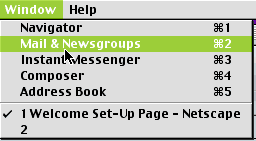
Mail & newsgroups settings. Use the keyboard shortcut Apple+2
to switch to Mail & Newsgroups.
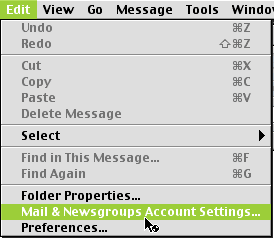
Click on Edit, and then Mail & Newsgroups
Account Settings...
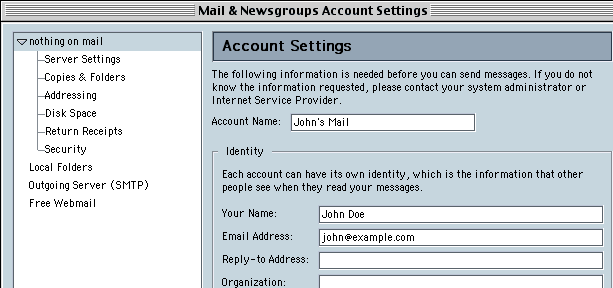
We want to edit an existing account, so click on the account you wish to
update in the list on the left.
Click on the "Server Settings" subcategory of
the Mail account.
The User Name is now the same as the E-mail Address.
Example: john@example.com previously had "john"
as the User Name, and it is now "john@example.com".
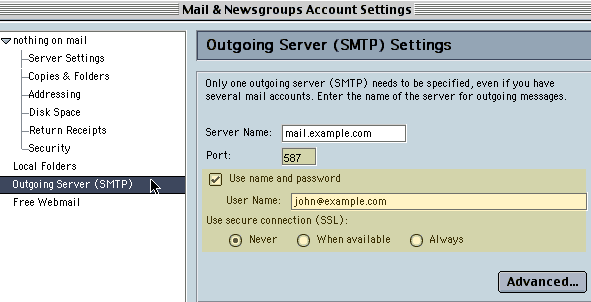
Click on the "Outgoing Server (SMTP)" on the
left window. Check the box, and enter your e-mail address as the User
Name.
Example: john_doe@example.com
Many ISPs block the default Outgoing SMTP port (25) on domains other than
their own. To avoid this difficulty, we highly recommend using port 587 for your Outgoing Mail.
You are now finished configuring your Netscape to the new mail system!
We will be adding more options in the near future!
ProHosting has hosted over 2,123,705 web sites since 1996!